April 15, 2014
The following information reflects what is new in the edX Platform as of April 15, 2014. See previous pages in this document for a history of changes.
edX Documentation
You can access the edX Status page to get an up- to-date status for all services on edx.org and edX Edge. The page also includes the Twitter feed for @edXstatus, which the edX Operations team uses to post updates.
You can access the public edX roadmap for details about the currently planned product direction.
The following documentation is available:
Building and Running an edX Course
You can also download the guide as a PDF from the edX Studio user interface.
Recent changes include:
- Expanded the Course Data, Enrollment, and Staffing sections.
- Updated Working with HTML Components to reflect the new HTML editor.
-
- Added the Custom JavaScript Applications chapter.
edX Studio
HTML Editor Upgrade
The HTML editor you use for HTML components, as well as Pages, was upgraded to improve usability.
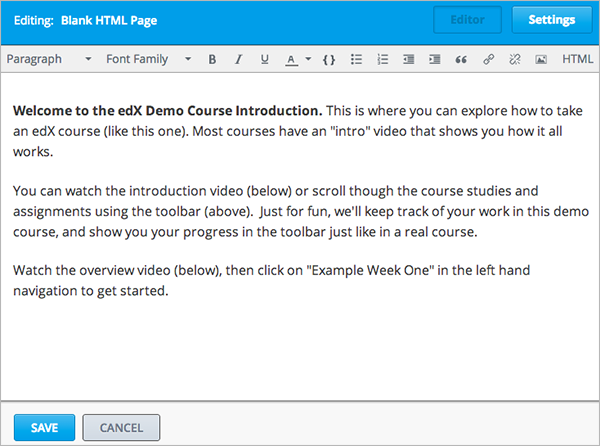
For instructions on using the new editor to add text, images, and links, see Working with HTML Components.
edX Learning Management System
- New View {page} in Studio buttons are available in the LMS Staff View to make navigating between a live course and Studio easier.
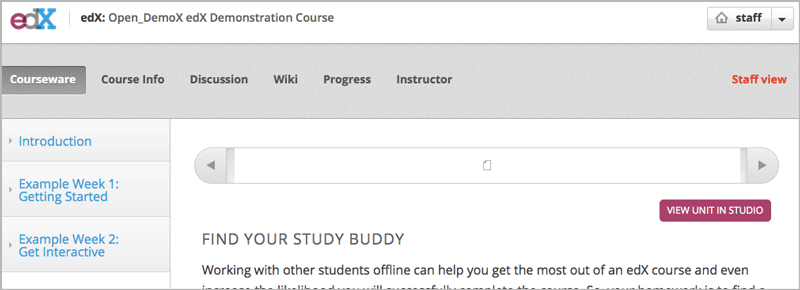
For more information, see Go to Studio from Your Live Course.
- A problem that prevented course staff from deleting the student’s state for an XBlock in the Beta Instructor Dashboard is now resolved. (LMS-2491)
- All error messages that can be produced when a problem is submitted for grading are now correctly written in Javascript. These messages can now be read by screen readers, and no longer cause exception errors. (LMS-2474)
- Video transcripts are now displayed in their source language. (BLD-935)
- Video transcripts are now available for all video speeds in Firefox. (BLD-958)